What are Workflow Components?
Workflow components are the fundamental parts that define and guide the flow of work in a process. They provide a clear roadmap for how a task begins, moves through various stages, and reaches completion. By breaking a workflow into components, organizations can identify inefficiencies, assign responsibilities, and integrate automation for better performance.
In practical terms, workflow components can be visualized as interconnected elements, each serving a unique purpose. For example, a procurement workflow will include components such as request submission (input), approval process (transformation), and purchase order generation (output). By clearly defining each step, businesses ensure that work moves systematically without unnecessary delays.
Key Workflow Components
Every workflow, regardless of its size or complexity, is built on core components that give it structure and functionality. Understanding each component in detail allows businesses to design processes that are consistent, scalable, and capable of delivering predictable results. Below is a detailed look at the main workflow components and their role in ensuring a process runs smoothly.
1. Input
The input is the foundational element that triggers the start of a workflow. It represents the data, documents, requests, or events needed to initiate the process. Inputs can be as simple as a customer filling out a form or as complex as system-generated data pulled from multiple applications. The quality and completeness of the input directly influence the accuracy of subsequent steps. For example, in an employee onboarding workflow, the input might include personal details, proof of identity, and signed contracts. If the information is incomplete or inaccurate, the rest of the process can stall or produce errors.
2. Transformation
Transformation refers to the actual work performed on the input to create the desired output. This is the “action” phase of the workflow, where tasks, decisions, and validations occur. Depending on the process, transformations can be automated (such as an invoice system automatically calculating tax) or manual (such as a manager reviewing a project proposal). In more complex workflows, transformation can involve multiple stages, conditional routing, and stakeholder interactions. The clarity of instructions and logical task sequencing in this stage ensures that work progresses without confusion or unnecessary delays.
3. Output
The output is the final deliverable produced when the workflow is complete. It could be an approved document, a completed product, a payment confirmation, or a resolved service request. High-quality outputs are crucial because they are often visible to customers, partners, or other stakeholders. For example, in a purchase order workflow, the output is not just the purchase order itself, but also the confirmation sent to the vendor, which must be accurate and timely. Outputs should always be aligned with the workflow’s goals and quality benchmarks.
4. Rules and conditions
Rules and conditions determine how a workflow operates under different circumstances. They include decision points, approval requirements, routing logic, and exception handling guidelines. For instance, in an expense approval workflow, a rule might state that expenses above $1,000 require approval from a senior manager, while lower amounts can be approved by a team lead. Well-defined rules prevent bottlenecks and ensure that tasks are routed to the right person or system at the right time.
5. Stakeholders and roles
Stakeholders are the individuals or teams responsible for specific tasks within the workflow. Roles define what each stakeholder can and cannot do within the process. Assigning clear responsibilities minimizes confusion, improves accountability, and ensures deadlines are met. For example, in a marketing campaign workflow, designers, content creators, and campaign managers each have distinct roles, and their tasks must be coordinated for timely delivery.
6. Tools and resources
Workflows rely on various tools and resources for execution. These can include software applications, templates, databases, communication channels, and automation platforms. Choosing the right tools ensures that each component of the workflow is supported by the right infrastructure. For example, using a project management platform with integrated file sharing, task tracking, and automated notifications can streamline a product development workflow significantly.
7. Feedback and monitoring
An often overlooked yet vital component is the mechanism for monitoring progress and collecting feedback. Tracking the performance of each workflow component allows businesses to identify inefficiencies and areas for improvement. For instance, real-time dashboards and analytics can reveal where delays are occurring, enabling managers to take corrective action before they affect the final output.
By clearly defining and managing each of these components, organizations can build workflows that are not only efficient but also adaptable to change. The strength of any workflow lies in the harmony and coordination of its components. When each part functions optimally, the process as a whole delivers consistent and measurable results.

Types of Workflow Components
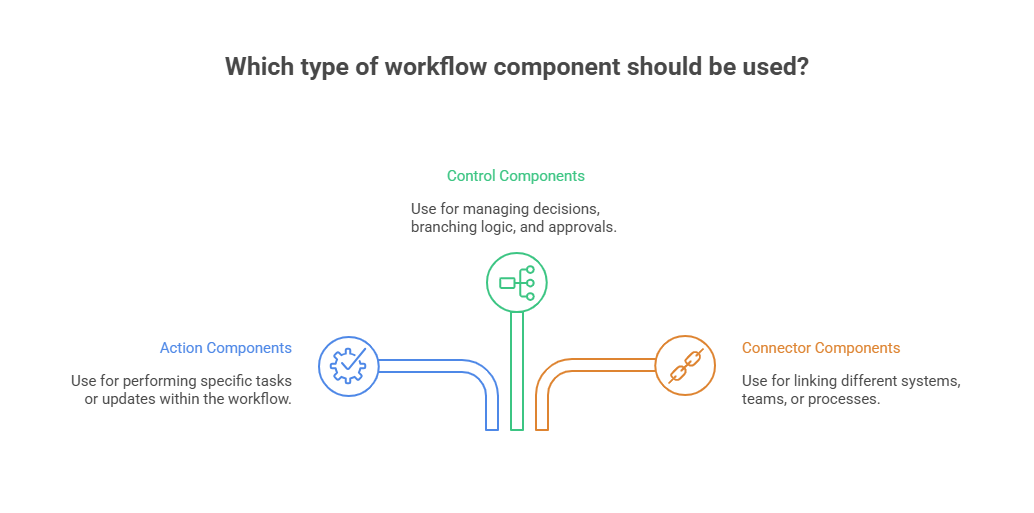
While every workflow is made up of core elements like input, transformation, and output, these can be further classified based on their function within the process. Understanding the types of workflow components helps businesses design processes that are not only efficient but also adaptable to different situations, tools, and business goals. Broadly, workflow components can be categorized into the following types:
Action components
Action components are the “doers” in a workflow. They represent the tasks or operations that move the process forward. These can range from simple manual activities, like filling out a form or sending an email, to complex automated actions, such as generating reports, updating databases, or triggering third-party integrations. In an HR recruitment workflow, for example, action components could include screening applications, scheduling interviews, and sending offer letters. The efficiency of action components determines the pace at which the workflow progresses.
Control components
Control components act as the decision-makers within a workflow. They are responsible for managing branching logic, approvals, and routing rules based on defined conditions. These components decide the direction the workflow takes under different scenarios. For instance, in a loan approval process, a control component might automatically route applications under a certain credit score to manual review, while fast-tracking qualified applicants. Effective control components ensure compliance, prevent errors, and maintain the integrity of the workflow.
Connector components
Connector components bridge gaps between different systems, departments, or stages of a process. They enable smooth data flow, communication, and collaboration by linking disparate parts of the workflow. For example, in a customer support workflow, a connector component might pull data from a CRM system, integrate it into a ticketing platform, and update the customer record once the issue is resolved. Without strong connector components, workflows can become fragmented, leading to delays and miscommunication.
Communication components
These components handle information sharing between stakeholders, ensuring everyone involved is aligned and informed at every stage. This includes automated notifications, reminders, alerts, and status updates. In a project approval workflow, for example, a communication component might send an automated email to the project lead once a budget is approved, ensuring work can begin without unnecessary waiting.
Data and resource components
Workflows depend on accurate data and the right resources to function effectively. Data components handle the collection, validation, and storage of information, while resource components ensure that tools, templates, and reference materials are readily available. In a product design workflow, these components might include access to design templates, historical performance data, and brand guidelines that guide the creative process.
Monitoring and analytics components
This type focuses on tracking workflow performance, identifying bottlenecks, and providing actionable insights. These components can include dashboards, progress trackers, and reporting systems that measure efficiency, accuracy, and compliance. For example, in an order fulfillment workflow, analytics components could highlight recurring delays in packaging, allowing managers to take corrective action quickly.
By combining these component types in the right way, organizations can create workflows that are not only logical and efficient but also flexible enough to adapt to evolving business needs. Action, control, and connector components form the backbone of most workflows, while communication, data, and monitoring components ensure that the process is transparent, resource-rich, and continuously improving.
Why Understanding Workflow Components is Important

1. What Workflows Represent
Workflows define the structure and sequence of tasks that guide how work is carried out within an organization. Understanding the components that make up a workflow is essential for building processes that are efficient, reliable, and adaptable. Without this understanding, workflows can become disorganized, inconsistent, and prone to errors.
2. Improved Process Clarity
Breaking a workflow into individual components provides greater clarity across the process.
- Teams gain better visibility into how each stage contributes to the final outcome
- Confusion is reduced by clearly defining responsibilities
- Bottlenecks, redundancies, and gaps become easier to identify
This structured approach helps teams understand not just what needs to be done, but how and by whom.
3. Increased Operational Efficiency
A clear understanding of workflow components is a key driver of efficiency.
Managers can identify exactly where delays or errors occur, such as:
- Incomplete information at the input stage
- Slow approvals during the transformation stage
- Miscommunication between stakeholders
Addressing these issues leads to faster turnaround times, smoother operations, and lower operational costs.
4. Stronger Quality Control
Each stage of a workflow directly impacts the final outcome. When any component is mismanaged—such as unclear decision rules, inaccurate data, or insufficient resources—it can compromise results.
By mapping workflow components, organizations can:
- Embed quality checkpoints at critical stages
- Detect issues early
- Prevent errors from escalating
This ensures consistency and reliability across processes.
5. Better Compliance and Audit Readiness
Clearly defined workflow components provide a solid foundation for regulatory compliance and audit requirements.
In industries such as finance, healthcare, and manufacturing:
- Well-documented workflows ensure traceability
- Every stage adheres to established protocols
- Compliance becomes part of the process, not an afterthought
6. Improved Scalability and Adaptability
Well-understood workflow components make processes easier to scale.
As organizations grow, they often need to:
- Handle higher workloads
- Introduce new tools
- Involve additional stakeholders
Structured workflows can be modified, expanded, or automated without disrupting ongoing operations.
7. Foundation for Effective Automation
Understanding workflow components is essential for successful automation.
Automation is most effective when:
- Processes are well-structured
- Roles and responsibilities are clearly defined
- Each stage is clearly mapped
This results in smoother automation implementation, reduced rework, and a higher return on investment.
What Does an Effective Workflow Include?
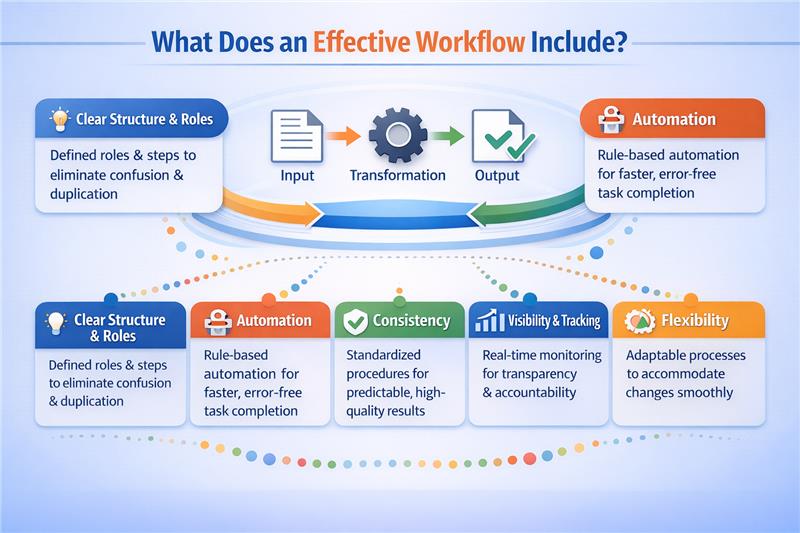
An effective workflow is not just a series of tasks but a well-structured system that ensures work moves smoothly from start to finish. While the core elements of input, transformation, and output form the foundation, a truly effective workflow also includes several qualities that enhance efficiency and reliability.
Clarity in structure and roles ensures everyone knows what needs to be done, who is responsible, and when it should be completed. Without this, teams may face confusion, duplicate work, or miss deadlines. For example, in a client onboarding process, assigning each step, such as contract signing, system setup, and training, to specific roles eliminates ambiguity.
Strategic use of automation allows repetitive, rule-based tasks to be completed faster and with fewer errors. This could include automating invoice approvals, sending reminders for pending tasks, or routing documents to the right department without manual intervention.
Consistency guarantees that outcomes remain predictable and meet quality expectations every time. In a content review process, applying the same review checklist for all materials ensures uniform standards are maintained.
Visibility and tracking give teams a clear picture of progress, bottlenecks, and resource allocation. This enables managers to address delays before they escalate and keep the process on track. Workflow management platforms often provide dashboards and reports to support this.
Built-in flexibility allows a process to adapt when requirements or circumstances change. For instance, if the scope of a project changes mid-way, a flexible workflow can accommodate new steps or additional approvals without disrupting progress.
By combining these qualities, workflows become more than just procedural checklists; they become robust systems that support productivity, accountability, and continuous improvement.
Optimizing Workflow Components with Automation

Automation plays a transformative role in enhancing the efficiency and accuracy of workflow components. By replacing repetitive manual tasks with automated actions, organizations ensure that each component functions seamlessly, reduces human error, and operates at optimal speed.
The objective of automation is not to eliminate human involvement entirely. Instead, it allows human effort to focus on high-value tasks while routine, rule-based processes are handled by technology.
Automation in the Input Stage
In the input stage, automation significantly improves data accuracy and speed.
Systems can pull data directly from integrated applications, online forms, or sensors
Manual data entry is eliminated, reducing duplication and errors
Processes begin with complete and accurate information
Example:
In an order management workflow, customer details and purchase history are automatically retrieved from a CRM system as soon as a new order is placed.
Automation in the Transformation Stage
During the transformation stage, automation ensures tasks follow predefined rules without delays or inconsistencies.
Automated routing sends work to the right person or system based on conditions
Parallel processing allows multiple steps to occur simultaneously
Rule-based execution removes dependency on manual coordination
Example:
In an employee onboarding workflow, automation can simultaneously send welcome emails, grant system access, and initiate equipment requests once the offer letter is accepted.
Automation in the Output Stage
In the output stage, automation ensures timely delivery and consistent quality of results.
Reports, approvals, confirmations, and documents are generated instantly
Deliverables are shared with relevant stakeholders without delays
Quality and consistency are maintained across outputs
Example:
After a loan application is approved, the system automatically generates the approval letter, updates the customer record, and notifies the applicant without manual intervention.
Automating Control and Compliance
Automation strengthens workflow control by enforcing organizational policies.
Spending limits, approval thresholds, and escalation rules are built into the system
Exceptions are automatically flagged and routed for review
Compliance is enforced consistently across processes
Improving Communication and Integration
Communication between stakeholders is enhanced through automation.
Automated notifications, reminders, and progress updates keep workflows moving
Decision-makers receive real-time visibility into workflow status
Integration capabilities allow workflow tools to connect with multiple business systems
Data flows smoothly between components without manual transfers
Analytics, Monitoring, and Continuous Improvement
Automation makes analytics and monitoring more effective.
Real-time dashboards and detailed reports track workflow performance
Bottlenecks and inefficiencies are identified early
Data-driven insights support continuous process improvement
These insights create a feedback loop that ensures workflow components evolve with changing business needs.
Long-Term Impact of Automation
When implemented thoughtfully, automation goes beyond optimization.
Builds a foundation for scalability and resilience
Supports innovation and operational agility
Enables organizations to shift from reactive problem-solving to proactive process management
Role of Cflow in optimizing workflow components
Cflow is a no-code workflow automation platform designed to help businesses build, customize, and manage workflows with ease. Its visual workflow builder allows teams to define each component clearly while connecting them seamlessly.
- Drag-and-drop workflow design enables quick creation of structured processes.
- Conditional logic and rules ensure workflows adapt to real-world variations.
- Integration capabilities allow inputs to be pulled from and outputs sent to multiple business applications.
- Role-based access controls keep responsibilities clear and data secure.
- Real-time tracking and analytics provide visibility into each workflow component’s performance.
By using Cflow, organizations can transform manual, disjointed workflows into automated, efficient processes where every component functions optimally.
Final thoughts
Workflow components are the building blocks of process efficiency. By understanding inputs, transformations, outputs, and the rules and roles that connect them, businesses can design workflows that are both effective and adaptable. With platforms like Cflow, it becomes easier to automate these components, reduce manual work, and improve operational performance. To see how Cflow can help you create efficient workflows from scratch, start your free trial today.
FAQs
1. What are the basic components of a workflow?
The basic components are input, transformation, and output. Inputs initiate the process, transformations process the data, and outputs deliver the final result.
2. How do workflow components improve efficiency?
By breaking a process into components, businesses can assign responsibilities, monitor progress, and identify areas for improvement, leading to faster and more accurate results.
3. Can workflow components be automated?
Yes, with workflow automation platforms, many components like data entry, approvals, and notifications can be automated to save time and reduce errors.
4. Are workflow components the same across industries?
hile the basic structure is similar, the specific tasks and tools in each component can vary depending on industry requirements and regulations.
5.How does Cflow help in managing workflow components?
Cflow provides a visual platform to design, automate, and monitor workflow components, ensuring seamless execution, compliance, and real-time tracking.
What should you do next?
Thanks for reading till the end. Here are 3 ways we can help you automate your business:

Do better workflow automation with Cflow
Create workflows with multiple steps, parallel reviewals. auto approvals, public forms, etc. to save time and cost.

Talk to a workflow expert
Get a 30-min. free consultation with our Workflow expert to optimize your daily tasks.

Get smarter with our workflow resources
Explore our workflow automation blogs, ebooks, and other resources to master workflow automation.
The post Understanding Workflow Components: A Complete Guide For Businesses appeared first on Cflow.